
Utilities Panel
Data flow control, counters, text processing, layer tools, unit conversion, and more.
 Data Dam
Pass or block data based on a boolean toggle.
| Input | Nickname | Description | Default |
|---|---|---|---|
| Pass Data | P | True to pass data through, false to block | false |
| Data | D | Data to pass or block | — |
| Output | Nickname | Description |
|---|---|---|
| Data | D | Passed data (null if blocked) |
 Counter
Stateful counter that increments each solve. Toggle Run to self-timer, or attach an external Timer. Stops at max value.
| Input | Nickname | Description | Default |
|---|---|---|---|
| Start | S | Starting value | 0 |
| Increment | I | Step size | 1 |
| Max Value | M | Maximum value (counter stops here) | 100 |
| Run | R | Start/stop counting (optional) | false |
| Interval | Int | Timer interval in ms (optional) | 100 |
| Reset | Rst | Momentary reset to start (optional) | false |
| Output | Nickname | Description |
|---|---|---|
| Value | V | Current counter value |
| Active | A | True while counter is still incrementing |
 Text Split
Split text by delimiter.
| Input | Nickname | Description | Default |
|---|---|---|---|
| Text | T | Input text to split | — |
| Delimiter | D | Delimiter string to split on | : |
| Output | Nickname | Description |
|---|---|---|
| Result | R | Text after first delimiter occurrence |
 Data Concatenator
Concatenate data from multiple inputs.
| Input | Nickname | Description |
|---|---|---|
| Data | D | Connect multiple sources (sliders, panels, etc.) |
| Output | Nickname | Description |
|---|---|---|
| Info | I | Formatted 'NickName: Value' per source |
 Geometry Filter
Filter mixed geometry lists by type with auto-attached dropdown.
| Input | Nickname | Description | Default |
|---|---|---|---|
| Geometry | G | List of mixed geometry to filter | — |
| Type | T | 0=Mesh, 1=Brep, 2=Surface, 3=Curve, 4=Point, 5=SubD, 6=Line, 7=Arc, 8=Circle, -1=Others | 0 |
| Output | Nickname | Description |
|---|---|---|
| Geometry | G | Filtered geometry matching the selected type |
| Indices | I | Indices of matching items from the input list |
 Get Object Layer
Get the layer of a referenced Rhino object.
| Input | Nickname | Description | Default |
|---|---|---|---|
| Objects | O | Referenced Rhino objects or object GUIDs | — |
| Full Path | F | Return full layer path instead of short name | false |
| Refresh | R | Toggle to refresh results | false |
| Output | Nickname | Description |
|---|---|---|
| Layer Names | L | Layer names for each object |
 Layer Visibility
Toggle layer visibility.
| Input | Nickname | Description | Default |
|---|---|---|---|
| Layer Name | L | Name of the layer to toggle | — |
| Visible | V | True to show, false to hide | true |
| Output | Nickname | Description |
|---|---|---|
| Info | I | Result message |
 Units to Points
Convert model units to typographic points.
| Input | Nickname | Description | Default |
|---|---|---|---|
| Value | V | Value in the selected unit | — |
| Unit | U | 0=MM, 1=CM, 2=Inches, 3=Feet | 0 |
| Output | Nickname | Description |
|---|---|---|
| Points | Pt | Value in typographic points |
 Points to Units
Convert typographic points to model units.
| Input | Nickname | Description | Default |
|---|---|---|---|
| Points | Pt | Value in typographic points | — |
| Unit | U | 0=MM, 1=CM, 2=Inches, 3=Feet | 0 |
| Output | Nickname | Description |
|---|---|---|
| Value | V | Value in the selected unit |
 RGB to Luminance
Convert RGB colors to luminance values with multiple luminosity models (BT.601, BT.709, BT.709 sRGB, Average).
| Input | Nickname | Description | Default |
|---|---|---|---|
| Colors | C | Input colors | — |
| Luminosity Type | L | 0=BT.601, 1=BT.709, 2=BT.709 sRGB, 3=Average | 2 |
| Invert | I | Invert luminance (Black=1, White=0) | true |
| Output | Nickname | Description |
|---|---|---|
| Values | V | Luminance values (0–1) |
| R | R | Red channel values (0–1) |
| G | G | Green channel values (0–1) |
| B | B | Blue channel values (0–1) |
| Alpha | A | Alpha channel values (0–1) |
 Pad Number
Pad numbers with leading zeros.
| Input | Nickname | Description | Default |
|---|---|---|---|
| Number | N | Integer to format | — |
| Total Digits | D | Total number of digits in output | 3 |
| Output | Nickname | Description |
|---|---|---|
| Formatted | F | Zero-padded number string |
 Sort Points
Sort points along an arbitrary direction vector with grouping tolerance.
| Input | Nickname | Description | Default |
|---|---|---|---|
| Points | P | Points to sort and group | — |
| Direction | D | Sort direction vector | XAxis |
| Tolerance | T | Grouping tolerance along the direction | 0.01 |
| Output | Nickname | Description |
|---|---|---|
| Sorted Points | P | Points sorted and grouped into branches |
| Group Count | N | Number of groups |
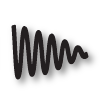 Dampened Sin Wave
Generate dampened sine wave values.
| Input | Nickname | Description | Default |
|---|---|---|---|
| X | X | Input X values | — |
| Amplitude | A | Wave amplitude | 1.0 |
| Frequency | F | Wave frequency | 1.0 |
| Damping | D | Damping per cycle (0 = none, 1 = fast decay) | 0.5 |
| Output | Nickname | Description |
|---|---|---|
| Y | Y | Output Y values |